Startup NeuAer just demonstrated some cool, almost science fictional technology for your smartphone today at the Launch conference in San Francisco.
The company has an Android application called ToothTag, which allows users to tag different objects and create different interactions. It uses the radio signals given off by various gadgets, including BlueTooth devices. So you could ToothTag set up a trigger that would drop a pin on your Android map whenever you park your phone. You could also tie the trigger to proximity, so that you’re alerted that whenever your child (or, more properly, their phone) gets too far from you, or whenever your ex-boyfriend or girlfriend gets too close.
And it sounds like ToothTag is just a showcase for Neuaer’s technology. The long-term goal is to allow mobile developers to build different proximity applications using Neuaer’s ProxPlatform technology.
The obvious question is, of course, how well it actually works. The demo worked fine, but whether or not that will hold true in the real world in another question. The other issue is that Neuaer doesn’t yet work on the iPhone. That could be a barrier to adoption, and it’s also frustrating for me, because I want it.
If you’ve ever played a game like Angry Birds on the iPhone and the iPad, you’ve probably been frustrated by the fact that you have to start over each time — your saved games don’t transfer. A new startup called FTW (which stands for “For the Win”, a popular phrase among Intenet users for expressing enthusiasm) wants to change that.
Founder Mark Burstiner, who was demonstrating the service on-stage this morning at the Launch conference in San Francisco, said that his company offers an application programming interface (API) that game developers can connect to. Then saved games are synchronized across the different versions of their games on multiple devices. As an example, Burstiner showed off a Tic Tac Toe game on both an iPhone and an iPad on-stage, where after each move he saved the game and the change was reflected on the other device.
Burstiner acknowledged that this is something that a game developer could add on their own, but he said it would take about 140 hours of work, and besides, the developer should be “building more games rather than more features for the one game.”
The expert judges at the conference had some reservations about the concept, particularly about whether this concept has long-term legs. Burstiner said that “cloud gaming” services like OnLive, where everything happens online and no cross-device syncing is needed, are probably the future. But it will be a long time before that becomes a reality, he said. and even then it still won’t represent the entire industry.
FTW is currently looking for iPhone, iPad, and Nintendo DS game developers to participate in its beta test. The company is still experimenting with business model, but it plans to charge both users and larger developers to use the service (indie developers will have free access).
Women now play games more than men, according to a report by mobile app analytics provider Flurry. At least that’s true in the realm of mobile and mobile social games, where the likes of Zynga’s FarmVille and Popcap’s Plants vs. Zombies are at the forefront.
More than half of all mobile and mobile social gamers — 53 percent, to be exact — are women, bucking the stereotype that gaming is typically a male-dominated form of entertainment, according to the report. Only 40 percent of “traditional” gamers are women, according to the report.
The report found that women social gamers were typically older than their male counterparts — as women outnumbered men in the 26 to 65 age range. Men barely outnumbered women in the 18 to 24 age range. Just about a third of all mobile and social gamers were also in that same age range — 18 to 24 — while about half of mobile and social gamers fell in the 26 to 44 age range.
A majority of mobile and social gamers also appear to come from middle-class origins and make between $50,000 and $80,000 yearly, according to the report. Mobile and social gamers typically earn 50 percent more than the average American and are twice as likely to have a college bachelor’s degree. The majority of mobile and social gamers — about 65 percent — are white, as well.
Flurry detected more than 250 million devices running Apple’s iPhone operating system and Google’s Android mobile operating system, and detects around 750,000 new activations across both operating systems each day, according to the report. Flurry tracks around 26 million unique users that play social games for an average of about 25 minutes each day.
How do traditional screen web designs translate on handheld devices? This series aims to identify constraints in mobile web design so we can better serve our users.
I remember when I first dabbled in Mobile Web Design. The year was 2006, and hype for the recently announced “.mobi” top level domain (TLD) was strong. Armed with my new BlackBerry Pearl 8100, I was ready to try my hand at building a mobile experience on its whopping 240x260px display.
That part of my life was short-lived. Between the sudden emergence of media-rich sites such as YouTube and Facebook, and the ensuing browser wars (that year marked the launch of both Firefox 2 and IE 7), my excitement for Mobile Web quickly diminished. To me, mobile wasn’t web on the go; it was the web of last resort.
Fast-forward five years and mobile had begun to gain traction. Competition in the mobile broadband market resulted in pretty decent download speeds. Furthermore, top-of-the-line devices boasted higher resolutions (and even came with color spaces that rivaled desktop monitors). The icing on the cake? Support for web standards across these devices matured greatly, which meant that design wasn’t as much a shot-in-the-dark as it used to be. Cameron Moll even wrote a book on the subject.
As it turns out, the Mobile Web is no longer the web of last resort. It’s the web of accommodation. Adapting to our busy lifestyles, it’s ready at the touch of a button.
Let’s get considerate
This series—Considerations for Mobile Design—aims to help experience designers understand how the transition to mobile affects their audience and, in turn, their designs. In the beginning, we’ll take a look at the rules governing today’s mobile sites. In part two, we’ll discuss how expectations might change as the underlying technology continues to improve. Along the way, we’ll cover mobile-specific interaction design, mobile device constraints, and building websites that are responsive, working well on both handheld devices and traditional screen displays. Ready? Let’s get started.
Speed. It’s important.
Let’s begin with an exposition.
Two trains leave from the same points of origin, traveling towards the same destination. They are identical in every way except one: the first train travels twice as fast as the second. Except for the occasional passenger who’s out to see the scenery, it’s obvious that the first train is the better choice when it comes to reaching your destination.
This illustration is more or less straightforward (especially in our case when users are watching a progress bar instead of some beautiful scenery), but it’s still an important concept. Our users use the web to get things done. As a consequence, time is of the essence. The choice of which specific tool (sites) they use is heavily influenced by just how quickly that tool accomplishes their goals. Therefore, optimize your websites to load as quickly as possible.
Because mobile devices transmit data at slower rates of speed, the weight of a website is even more critical. While many mobile devices are now offering packages with even faster transfer rates, it’s not uncommon for users to have sub-256Kbps connections, which means we need to make every bit count.
Since we’re talking about some pretty nuanced stuff here, let’s take a second to address some of the basics.
Kbps vs. KBps vs. Mbps
The following are some common units of measurement with regards to data transfer online.
Kb: Kilobit (128 bytes)
KB: Kilobyte (8 Kilobits)
Mb: Megabit (128KB or 1024Kb)
MB: Megabyte (8Mb or 1024KB or 8192Kb)
People often get confused when working with Kilobytes vs. Kilobits, and misunderstand how fast download speeds are as a result. If your download rate is 256Kbps (Kilobits per second), you will not download a 256KB (Kilobyte) file in 1 second. Since there are 8 Kilobits in 1 Kilobyte (there are 8 bits in a byte), a 256Kbps download rate take about 8 seconds to download a 256KB file.
To convert Kbps to speeds you may be more comfortable working with, you could do the following:
Kbps to KBps: Kbps / 8 = KBps
Kbps to Mbps: (Kbps / 8) / 128 = Mbps
Speeds change but expectation is constant
Ten years ago, 256Kbps would have suited most people perfectly. In a world where 150Kbps-1Mbps download rate was considered “normal” for high speed—and a typical webpage weighed in at under 100Kb—256Kbps meant that websites loaded almost instantaneously.
According to researchers from the University of Twente, nearly all web traffic in 2000 was caused by plain ol’ images and text. That number changed dramatically by 2007, though, when most online traffic became dominated by photos, videos, and other binary downloads. As a consequence, the mean response size (size of files transmitted over the web) increased by over 500% in that period of seven years.
So much has changed in how people use the web over the past decade. Today we stream video; present graphically rich interfaces; and use relatively heavy client-side scripts (relative to ten years ago) to tie it all together. But despite all this, the relative speed of the user’s experience has remained constant, or even improved. How could this be?
In 2010, the United States FCC defined “Basic Broadband” as a data transmission speed of at least 4 Mbps downstream. Coupled with the fact that the the average page size that year was 320KB, a typical load time for a web page in 2010 was under 1 second. In other words, we’re still loading modern, richly textured web applications instantly, or at least fast enough that it doesn’t bother anyone.
Whether you’re designing a web application in 2011, or an entirely new experience in 2020, users have come to expect a quick and responsive experience. If a user has a choice between two tools that accomplish the same task, and one does so faster than the other, that’s the one they are more likely to choose.
Translating the experience to mobile devices
If we serve the same heavy weight user experiences to mobile devices that we do on our high-bandwidth devices, we run the risk of causing long load times and unresponsive websites. To demonstrate how detrimental this could be to the potential experience, observe the weight of the following sites, and their approximate load times given a 256Kbps download speed:
Website Load Times
Website
Page Size
256Kbps (32KBps) Download Rate
4Mbps (512KBps) Download Rate
CNN.com
1.07MB
34.2 seconds
2.1 seconds
Reuters.com
264.37KB
8.2 seconds
.5 seconds
BBC.co.uk
193.49KB
6 seconds
.4 seconds
YouTube.com
400.42KB
12.5 seconds
.8 seconds
Facebook.com
360.6KB
11.3 seconds
.7 seconds
These figures reveal how our expectations of websites have changed. Some of the most visited websites in the world today would have taken 10+ seconds to download on broadband standards of the early 2000′s. These standards are going to continue to change, and we’ll continue to demand more from our web apps as technology improves. It’s important that we scale our experience given the technology available to our users.
If we assume that a user is more accustomed to browsing the web from a desktop, we can use that experience as an “okay” benchmark for how long a user is willing to wait on a mobile device.
So, how long does the same website take to load on a standard mobile broadband speed compared to a basic broadband speed (4Mbps)? The table below details how the same five sites previously examined load their mobile counterparts.
Mobile Website Load Times
Website
Page Size
256Kbps (32KBps) Download Rate
987Kbps (123KBps) Download Rate
m.CNN.com
77.95KB
2.6 seconds
.6 seconds
mobile.Reuters.com
36KB
1.2 seconds
.3 seconds
BBC.co.uk/mobile
31.14KB
1 second
.3 seconds
m.YouTube.com
21.76KB
.7 seconds
.2 seconds
m.Facebook.com
17.4KB
.6 seconds
.1 second
According to a study by PCWorld and Novarum Inc in 2009-2010, the avg. download speed between the AT&T, Sprint, T-Mobile, and Verizon 3G networks was 987Kbps. Some providers may throttle users that exceed a monthly data limit to significantly lower data rates (ie: T-Mobile reduces download speeds after customers reach a 5GB limit).
The mobile versions of these sites strive to minimize load time on mobile devices by drastically reducing their total weight. When you compare the results to the default site on a basic broadband connection, you’ll find that there is little difference.
Consider what would happen if Facebook didn’t have a mobile version of their site. How long would the load time be? How much of that load time would be wasted if the device used had a poor resolution? or if it lacked multi-touch ? While devices such as the the iPhone have done an outstanding job of building systems for zooming and panning traditional websites, other devices are still catching up. If users wait a long time for a website they ultimately can’t use, their experience is ruined.
The bottom line is that most Facebook users expect very quick load times on their desktops. Asking those same users to wait 11 seconds for a page to load is simply unacceptable.
Closing thoughts
And on that note, we’re going to close this part of our series. When we resume this series, we’ll discuss more specific design constraints, how to design for specific mobile devices, and emergine conventions and frameworks that will help us build more powerful mobile experiences. Before I leave you, though, there are a few resources worth mentioning:
While not strictly mobile-related, the FCC released a report in 2010 on the Status of Internet Access Services. The document contains lots of very insightful statistics in regards to how speed and access has changed over the past decade for residential users.
I wasn’t able to find a dedicated calculate for finding page load times given certain connection speeds (if you have one, please leave it in the comments!). However, you can find out the total size of all files loaded on a website pretty easily with Firebug. Plug the total page size into one of the formulas above, and you can get a good idea of how long it should take to download all items on a page. Please note that this system does not take latency into account, so it should not be thought of as an accurate way to find the total time a page will take to load.
To believe some of the worrywarts around Washington, we find ourselves in the midst of a miserable mobile marketplace experience. Regulatory advocates like New America Foundation, Free Press, Public Knowledge and others routinely claim that the sky is falling on consumers and that far-reaching regulation of the wireless sector is needed to save the day.
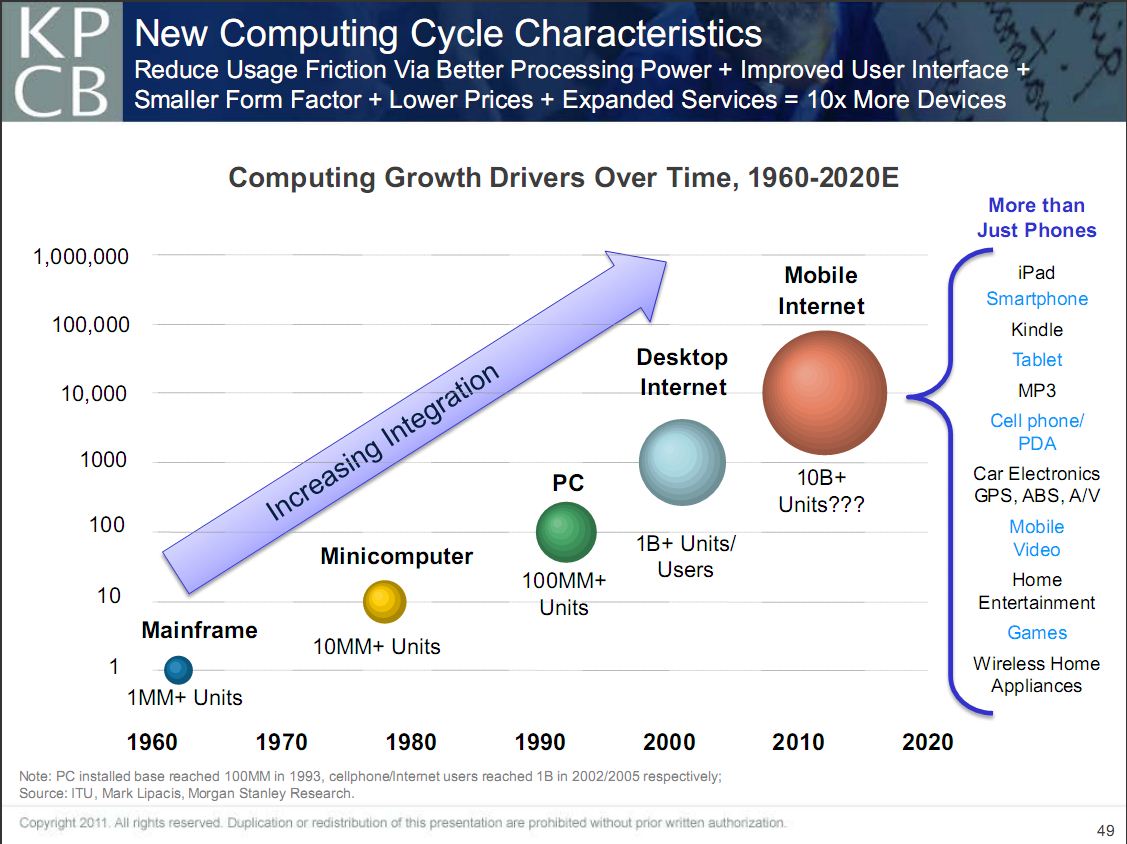
I hope those folks are still willing to listen to facts, becuase those facts tell a very different story. Specifically, I invite critics to flip through the latest presentation by Internet market watchers Mary Meeker and Matt Murphy of Kleiner Perkins Caufield & Byers on “Top Mobile Internet Trends” and then explain to me how we can label this marketplace anything other than what it really is: One of the greatest capitalist success stories of modern times. Just about every metric illustrates the explosive growth of technological innovation in the U.S. mobile arena. I’ve embedded the entire slideshow down below, but two particular slides deserve to be showcased.
The first slide illustrates “Computing Growth Drivers Over Time” from the 1960s to present and shows how roughly 10 Billion mobile Internet devices will soon be upon upon us. TEN BILLION!! As the subtitle of the slide summarizes: “Reduced Usage Friction via Better Processing Power + Improved User Interface + Smaller Form Factor + Lower Prices + Expanding Services = 10xMore Devices.” Again, absolutely amazing innovation is occuring in all layers of this space.
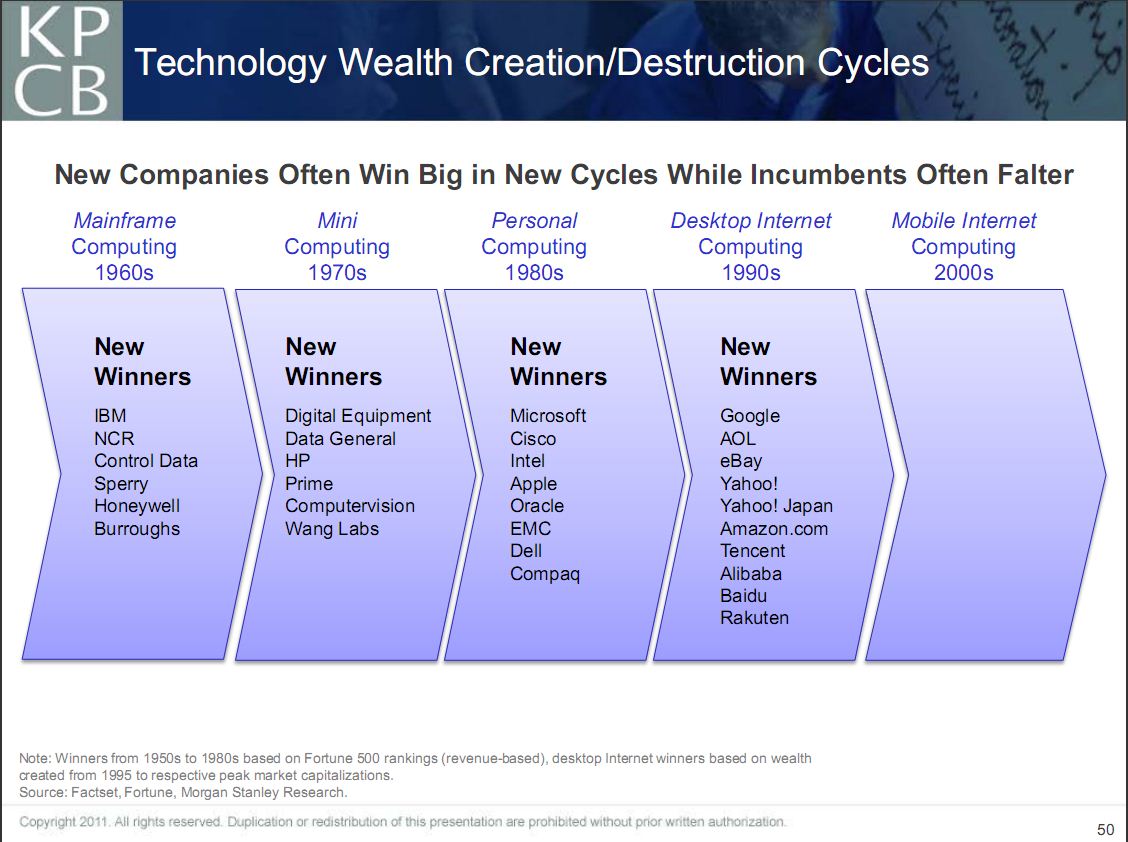
But wait, shouldn’t we fear that the same old big, bad corporate behemoths will dominate the mobile Internet marketplace? The second slide down below explains why such pessimism is unwarranted. True, every generation has its share of large operators in each sector, but Meeker and Murphy’s depiction of “Technology Wealth Creation / Destruction Cycles” over time illustrates why high-tech markets are far more dynamic than critics suggest.
As the subtitle of that slide notes, “New Companies Often Win Big in New Cycles While Incumbents Often Falter.” Today’s titans often become tomorrow’s technological also-rans. For example, who in the 1970s would have thought that anyone could give IBM a serious run for its money? And yet IBM ended up completely missing the boat on the rise of home personal computing as the company was myopically stuck in a mainframe mindset that made it serious money in the past but crippled the company for the future. (See this post for more details on the dramatic decline of Big Blue.) Ditto for AOL in the late 1990s or early 2000s. As I’ve documented here before, AOL was considered the unassailable giant of the Internet space during that period. Today, many of us struggle to figure out how the company even still exists! In other words, today’s mobile marketplace giants won’t likely be tomorrow’s. New forces and faces will move in that we can not yet fathom.
Bottom line: Don’t let the cyber-Chicken Littles and tech worrywarts fool you. Things are getting better all the time!
 Startup NeuAer just demonstrated some cool, almost science fictional technology for your smartphone today at the Launch conference in San Francisco.
 If you’ve ever played a game like Angry Birds on the iPhone and the iPad, you’ve probably been frustrated by the fact that you have to start over each time — your saved games don’t transfer. A new startup called
  Women now play games more than men, according to a report by mobile app analytics provider Flurry. At least that’s true in the realm of mobile and mobile social games, where the likes of Zynga’s FarmVille and Popcap’s Plants vs. Zombies are at the forefront.